MkDocs RAG Documentation Assistant
- #RAG
- #generative ai
- #documentation
- #mkdocs
- #FastAPI
- #google gemini
- #Vector Search
- #AI
- #Artificial Intelligence
- #Python
- #llm
- #Machine Learning
- #Software Engineering
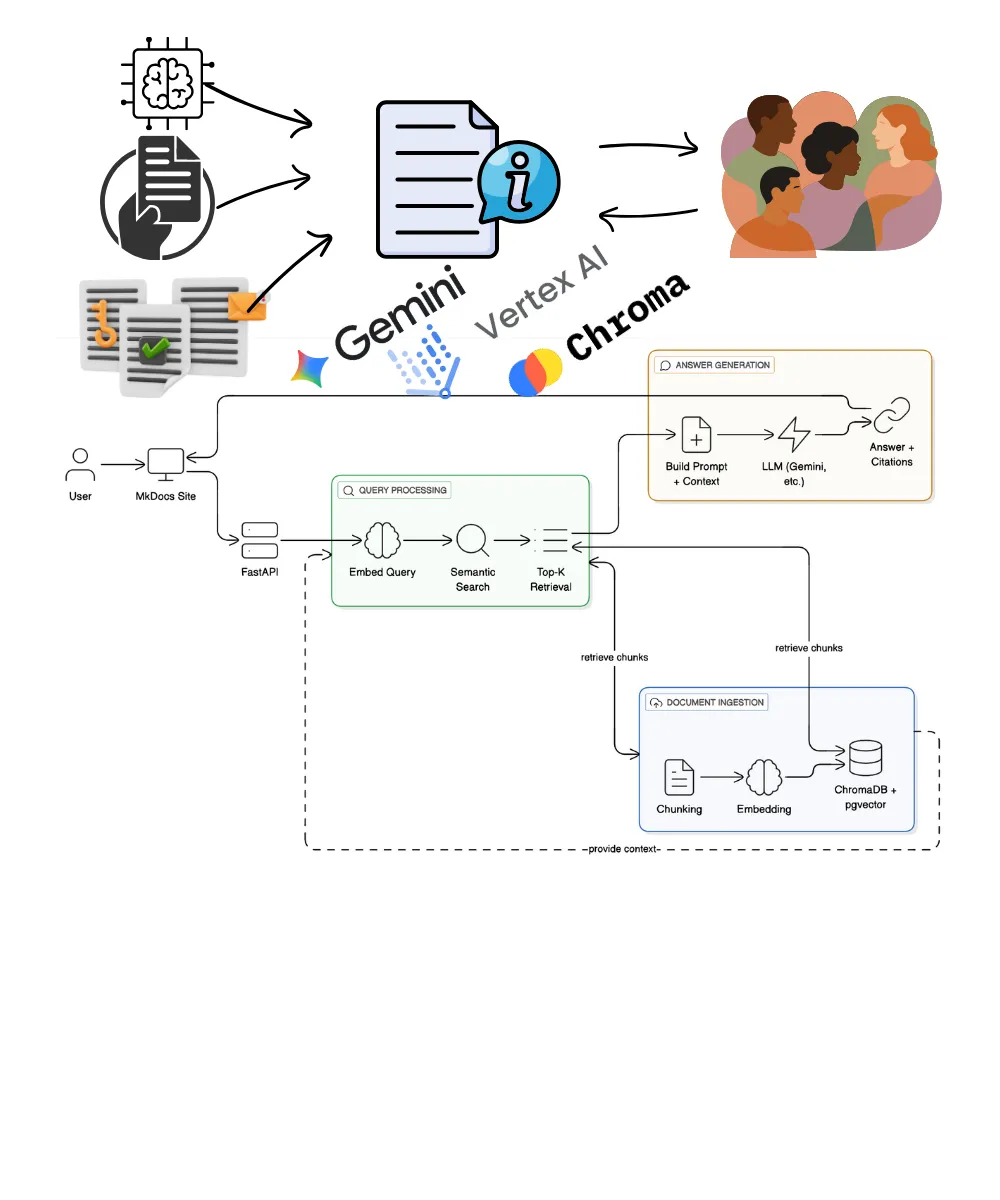
Documentation is most valuable when it can be interrogated without losing its source of truth.
The MkDocs RAG Documentation Assistant was a small but complete exploration of that idea: keep the published documentation as the canonical system of record, build a retrievable index from it, and expose a chat interface that answers with citations rather than model memory alone.
The important design constraint was trust. A documentation assistant should not behave like a generic chatbot with a docs-themed prompt. It should make the retrieval path visible, preserve source metadata, and give the reader a route back to the original material.
DevFest on Discord talk
What the project does
The project combines a MkDocs documentation site with a retrieval-augmented generation pipeline. A user asks a question inside the documentation experience. The backend validates the request, embeds the query, retrieves relevant chunks from a derived vector index, constructs a grounded prompt, asks Gemini to generate an answer, and returns both the answer and the supporting citations.
The workflow has four boundaries worth making explicit:
- The documentation boundary owns the source markdown and the reader-facing MkDocs experience.
- The RAG service boundary owns validation, embedding, retrieval, prompt construction, generation, and API contracts.
- The derived-index boundary owns the vector representation, but not the truth. It can be rebuilt from the source documents.
- The operational boundary keeps the assistant aligned with documentation changes through a controlled reindexing path.
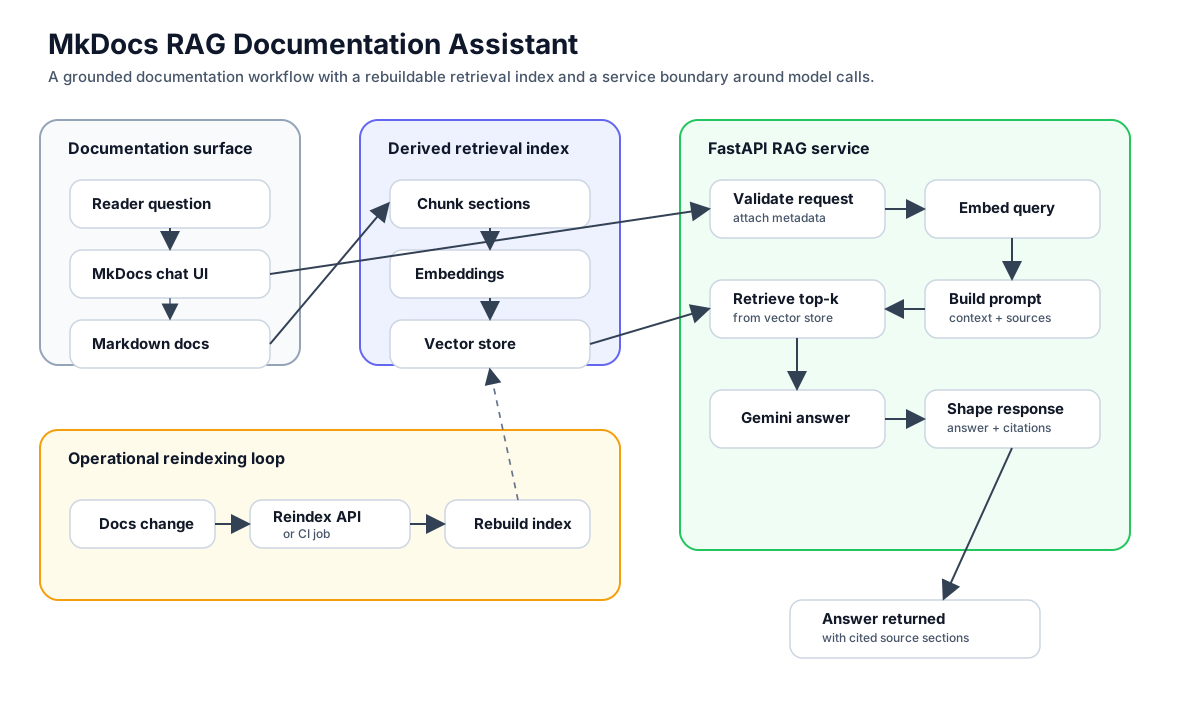
MkDocs RAG Documentation Assistant architecture workflow.
That structure matters because the assistant is only useful if each layer has a clear responsibility:
- The documentation remains the system of record.
- The vector store is derived infrastructure that can be rebuilt.
- The retriever narrows the context window to the most relevant sections.
- The generation step is constrained to answer from retrieved context, not unrestricted model memory.
- Citations are part of the trust model, not a presentation detail.
- Reindexing is an operational workflow, not an occasional manual clean-up task.
Why MkDocs was a useful frontend
MkDocs was a good fit because it kept the assistant close to the source material. The content already existed as structured markdown, the navigation model was familiar to readers, and the assistant could be added without turning the documentation site into a separate product surface.
The frontend used:
- MkDocs with the Material for MkDocs theme.
- A lightweight JavaScript chat interface.
- Responsive behaviour for desktop and mobile.
- Support for light and dark modes.
- Clickable citations back into the relevant documentation sections.
The key design choice was to avoid making the assistant feel like a separate application. It should sit next to the documentation, respect the same information architecture, and help readers move from question to cited source quickly.
Backend architecture
The backend was deliberately separated from the documentation UI. That kept secrets, model calls, indexing logic, and API contracts out of the browser, and made the assistant deployable as a service rather than a script embedded in a static site.
I used FastAPI because it provides a clean API surface, fast iteration, and good support for typed request and response models.
The backend responsibilities were:
- Accept chat requests from the documentation UI.
- Embed incoming questions.
- Search the vector store for relevant chunks.
- Format retrieved context with source metadata.
- Call the generation model.
- Return the final answer and citations.
- Expose health and reindexing endpoints.
The main API endpoints were:
POST /api/chat: ask a question about the documentation.GET /api/models: list available model options.POST /api/reindex: rebuild the vector index when documentation changes.GET /health: service health check.GET /docs: FastAPI’s generated API documentation.
That boundary is important. It makes the system easier to deploy, secure, observe, and change without coupling every backend decision to the static documentation frontend.
Document ingestion
The ingestion pipeline is where many RAG systems either become reliable or quietly fail. The model can only cite what the pipeline preserves, so chunking and metadata are part of the product contract, not implementation detail.
The process starts with the markdown files in the documentation site.
The pipeline:
- Scans the configured docs directory for markdown files.
- Splits documents by headings.
- Adds overlap so chunks retain enough context.
- Generates embeddings for each chunk.
- Stores the vectors with source metadata.
That metadata is important. Without it, the assistant may still answer, but it cannot explain where the answer came from. For documentation assistants, citation is not an optional decoration. It is part of the trust model.
Retrieval and generation
When a user asks a question, the system embeds the query using the same embedding model used during indexing. It then performs semantic search against the vector store and retrieves the top-k chunks.
The retrieved context is formatted into a prompt and passed to Gemini. The response is only valuable when it is traceable back to the source chunks, so the output contract includes both answer text and citations.
This pattern is simple, but it exposes the core trade-offs in RAG:
- Small chunks improve precision but can lose context.
- Large chunks preserve context but can dilute relevance.
- More retrieved chunks increase coverage but also increase prompt size.
- Strong citations improve trust but require careful metadata handling.
Those trade-offs are the real lesson of building the project.
Vector storage
For local development, ChromaDB was enough. It gave me a practical vector store for embedding storage and similarity search without forcing the project into heavy infrastructure too early.
For a real production version, I would be more careful about persistence, access patterns, and operational behaviour. A managed database with vector support, such as PostgreSQL with pgvector, would be a more natural fit once the assistant became part of a larger product.
The important point is that the vector store is derived data. It can be rebuilt from the markdown source. That should shape the design:
- Keep the source documents versioned.
- Make ingestion repeatable.
- Make reindexing safe.
- Treat the vector store as disposable infrastructure, not the source of truth.
Reindexing
Documentation changes, so the index must change with it.
The project includes a reindexing endpoint that clears the existing vector store, scans the markdown files again, regenerates embeddings, and updates the searchable index.
That reindexing path can be triggered manually through an API endpoint or wired into CI/CD. In a production setup, I would connect it to the documentation deployment workflow so the assistant’s knowledge stays aligned with the published docs.
Model support
The first implementation centred on Gemini because it gave me a straightforward path for embeddings and answer generation.
The architecture also left room for multiple generation models:
- Gemini 2.5 Flash for fast, cost-effective responses.
- Groq-hosted Llama models for fast open model inference.
- Mixtral-style models for more complex reasoning experiments.
The point was not to make model switching the headline feature. The useful part was designing the assistant so the retrieval layer, prompt construction, and model call were separate enough to evolve independently.
Deployment shape
The deployment shape matters because a documentation assistant becomes part of the documentation experience. It needs a clean backend and frontend boundary, controllable reindexing, secret management, and enough observability to understand whether failures come from retrieval, prompt construction, model generation, or stale source content.
The project was designed with a real deployment path in mind:
- The backend can run as a containerised FastAPI service.
- The documentation frontend can be built as static MkDocs output.
- The RAG service can be deployed behind an API endpoint.
- Secrets stay on the backend.
- Reindexing can be controlled rather than exposed casually to users.
For Google Cloud, the natural shape is:
- Cloud Run for the FastAPI backend.
- Firebase Hosting or another static host for the MkDocs site.
- Secret Manager for API keys.
- Cloud Build and Artifact Registry for container builds.
- Cloud Logging for basic observability.
What I learnt
This project made RAG feel less like a prompt pattern and more like a data product. The core work is not “ask a model over docs”; it is maintaining a trustworthy path from source material to derived index to generated answer.
The most useful lessons were:
- Retrieval quality determines answer quality more often than the prompt does.
- Good chunking is product design, not just text processing.
- Citations require metadata discipline from the beginning.
- Reindexing is part of the system, not an admin afterthought.
- The vector index should be reproducible from source documents.
- A documentation assistant needs clear failure behaviour when the docs do not contain an answer.
What I would improve next
If I were taking this further, I would focus on evaluation and observability.
The next version should include:
- A small test set of documentation questions with expected source sections.
- Retrieval metrics to measure whether the right chunks are being returned.
- LLM-as-a-judge checks for groundedness and answer relevance.
- Trace logging for each request so retrieval, prompt construction, and generation can be debugged separately.
- User feedback on answer usefulness.
- A safer fallback path when context is insufficient.
That is where a documentation assistant starts moving from an impressive demo to a dependable internal tool.
Project links
- GitHub repository: github.com/ThamuMnyulwa/mkdocs_rag
- Portfolio page: MkDocs RAG Documentation Assistant
Closing thought
The lesson from this project is that RAG is a system boundary, not a feature. Source content, chunking, embeddings, retrieval, prompt construction, answer generation, citation, evaluation, and deployment all affect whether the assistant can be trusted.
When those parts are visible and replaceable, the architecture becomes easier to operate and improve. That is the kind of documentation assistant I would want in production: useful for the reader, inspectable for the maintainer, and grounded in the material it claims to explain.